Learning log 01

Designing for unfamiliar domains

How being new to APIs led me to build a user research practice for developer tools at Postman.
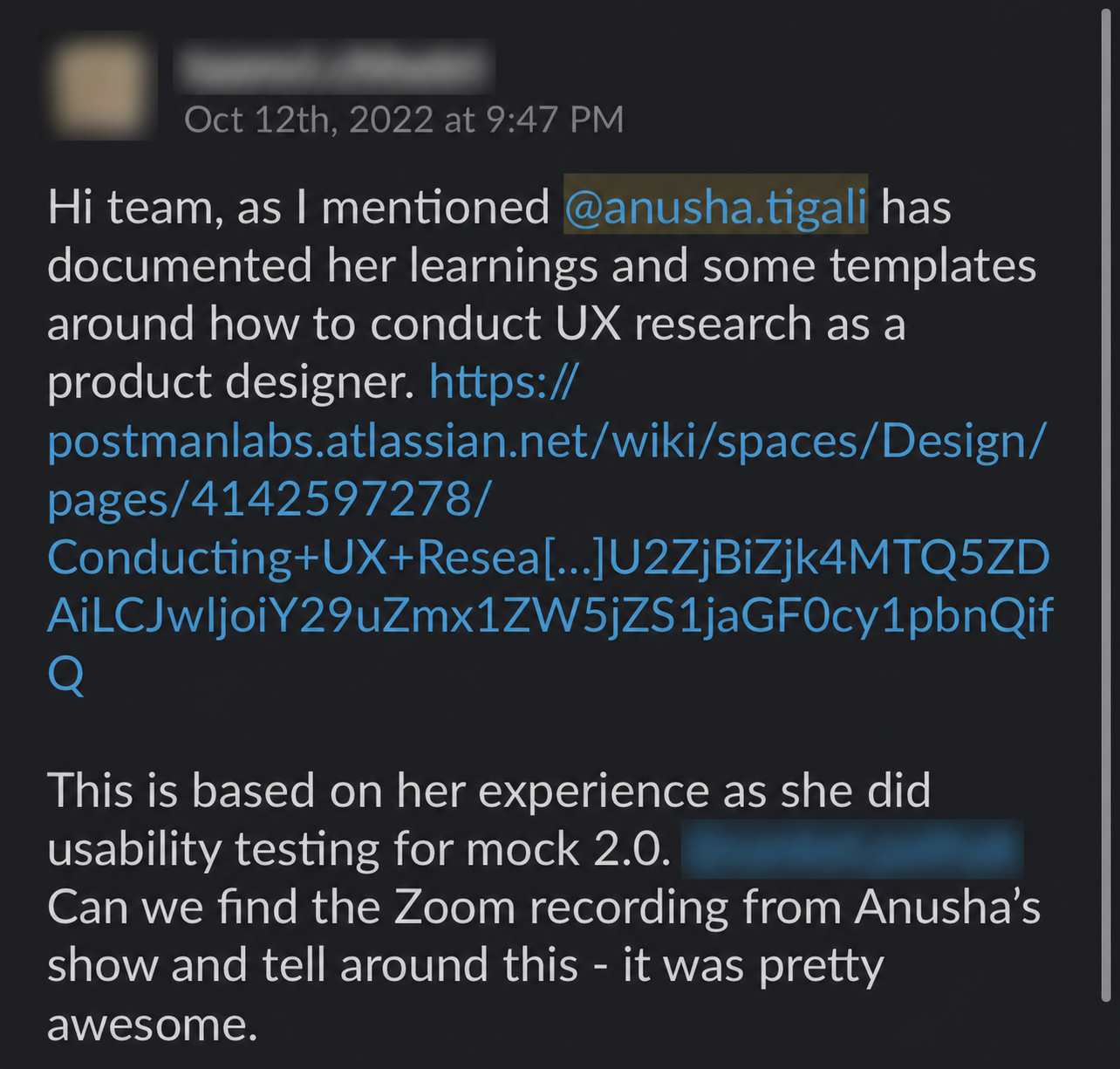
An anonymized colleague message praising the documented UX research process and templates. An anonymized colleague message praising the research presentation and its impact on the design team.
Some shoutouts from my team.

TL;DR

I didn’t know enough

→ so I used product analytics to find experienced users

but I couldn’t understand every technical detail

→ so I partnered with engineers during research

But we didn't just want the conversation to end with a feature list

→ so we observed real workflows and built with users

we tested and iterated for ~30 days

→ took the evidence back to product leadership

→ and turned what worked into a research playbook for other designers.

That's the neat version.

The interesting parts are everything that happened between those arrows: how we used six months of usage data to find the right developers, why engineers became part of my research process, what changed when users became collaborators instead of interview participants, the research session that didn't go according to plan, and how one product study eventually became a reusable research practice.

Designing a developer tool I didn't yet understand

When I joined Postman, I was moving from an agency into a product company. I was also moving into a technical domain that was completely unfamiliar to me: APIs.

One of the first developer tools I was responsible for was Postman Mock Servers.

The simplest way to understand a mock server is as a stand-in for a real server. When teams are building APIs, the client and server may not be ready at the same time. Developers still need a way to build and test how the two will eventually communicate, so a mock server gives them something predictable to work with before the real server exists.

I understood how this worked in theory.

What I didn't understand was how developers were actually using it.
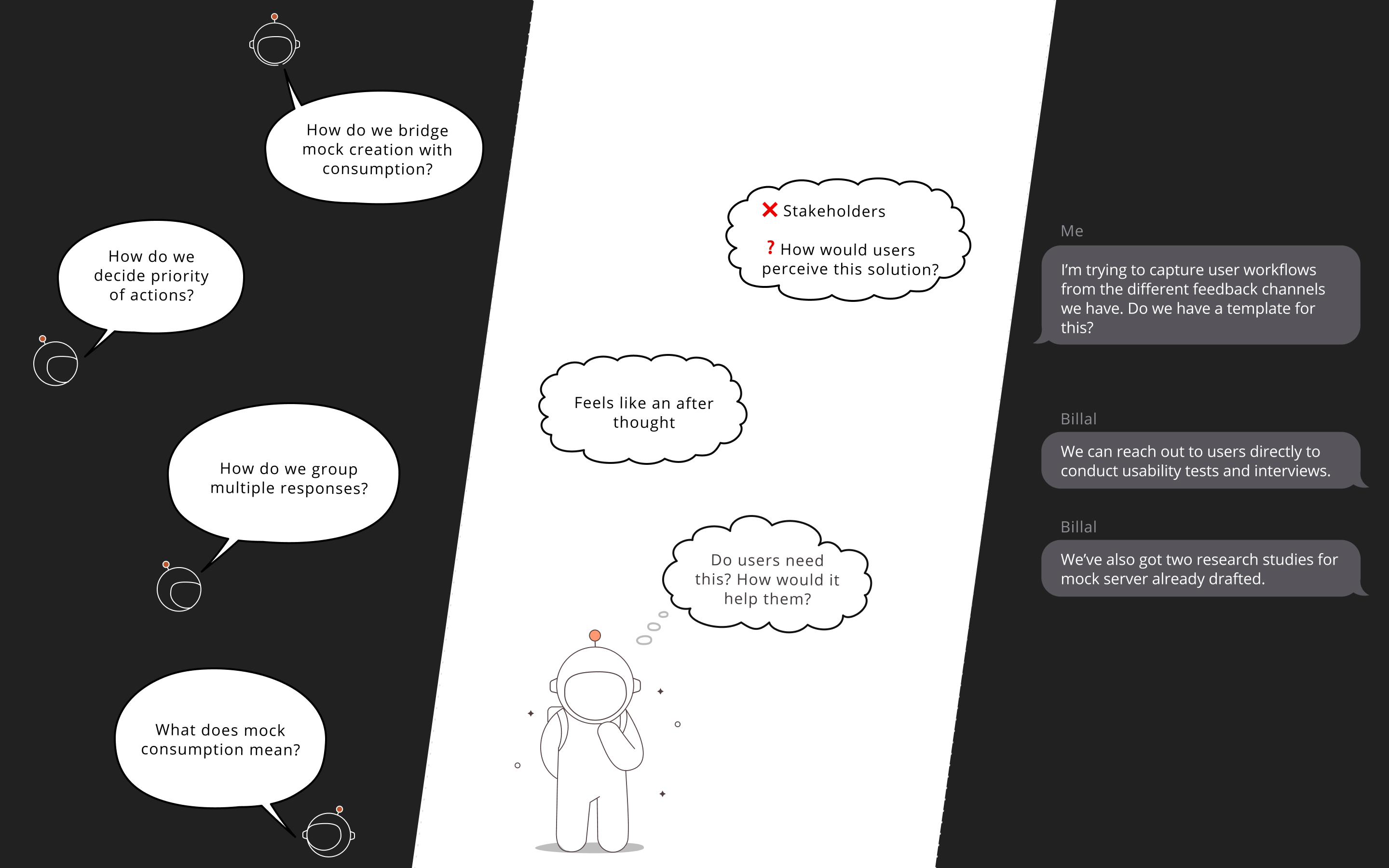
Three perspectives on the Mock Server problem: the team asks how creation and consumption connect, stakeholders question whether users need the proposed solution, and internal conversations reveal the need to research real user workflows.
Our early understanding was fragmented across team questions, stakeholder assumptions, and internal conversations. We needed direct research to understand how developers actually used Mock Servers.

That mattered because the PM who had previously owned Mock Servers was leaving when I joined the team. There wasn't a clear product roadmap waiting for us. There was me, a product designer still learning APIs, and a team of engineers who understood the technology far better than I did.

I was fortunate to work closely with an engineer, Aman Dhembla (opens in a new tab), who helped me understand the fundamentals of APIs, Mock Servers and the underlying technology. As a team, we could generate plenty of ideas for what the product could do next.

So I learnt how Mock Servers were meant to be used. I didn't know whether that matched how developers actually used them, where they struggled, what they'd worked around, or where Mock Servers fit into their broader API development workflow.

Before making product decisions, I needed to understand that.

Using product analytics to find the right users

The first question was which developers.

Someone who had created one mock server once wouldn't necessarily tell us much about how the product fit into a real development workflow. Fortunately, usage analytics had already been set up for Mock Servers.

Aman Dhembla (opens in a new tab) and I reviewed roughly six months of usage data to identify developers who used Mock Servers regularly.

We deliberately looked beyond one-time creation. We wanted sustained behaviour: developers who had created mock servers, returned to use them, and potentially created more.

These were people for whom Mock Servers appeared to be an actual part of their work.

Research recruitment brought another set of practical questions. We had to understand company policies, decide how to compensate participants for their time, and find incentives that made sense for Postman's developer community. We eventually offered Amazon gift vouchers alongside Postman swag.

We contacted around 100 users, about ten responded.

The analytics had helped us identify who to speak to. The research could now help us understand why they behaved the way they did.

But getting those developers into a conversation exposed the next gap.

Many of them knew far more about APIs than I did.

Pairing design research with engineering expertise

Being new to APIs meant accepting the limits of my technical knowledge.

The developers we interviewed could surface deeply technical questions I wasn't equipped to answer. Pretending otherwise wouldn't make the research better.

So I stopped treating user research as something the designer needed to conduct alone.

I began partnering with an engineer during research sessions.

The engineer could explore technical details, understand implementation questions and troubleshoot problems as they emerged. That allowed me to concentrate on a different layer of the developer experience.

Where did someone hesitate? What did they ignore? What had they learned to work around? Where did their mental model differ from ours?

The partnership worked because neither of us needed to play the other's role. Engineering brought technical depth. I focused on user behaviour, workflows and experience.

I didn't need to be the API expert in the room. I needed to make sure the right expertise was represented in it.

That solved the knowledge gap in the conversation.

But there was another limitation I wanted to avoid: asking developers to describe their workflows instead of actually seeing them.

Moving from user interviews to collaborative prototyping

I didn't want the research to become a series of interviews where developers told us what features they wanted and we went away with a list.

We wanted to see the work itself. So we structured the research in two parts.

First, developers walked us through how they currently used Mock Servers. This gave us direct observation of their workflows and allowed us to compare what we saw with patterns in our product analytics.

Then the relationship changed.

Instead of only interviewing users, we started building with them.

We created our own mock servers and API collections. We brought product concepts into sessions and let participants work through newer versions of the experience with us.
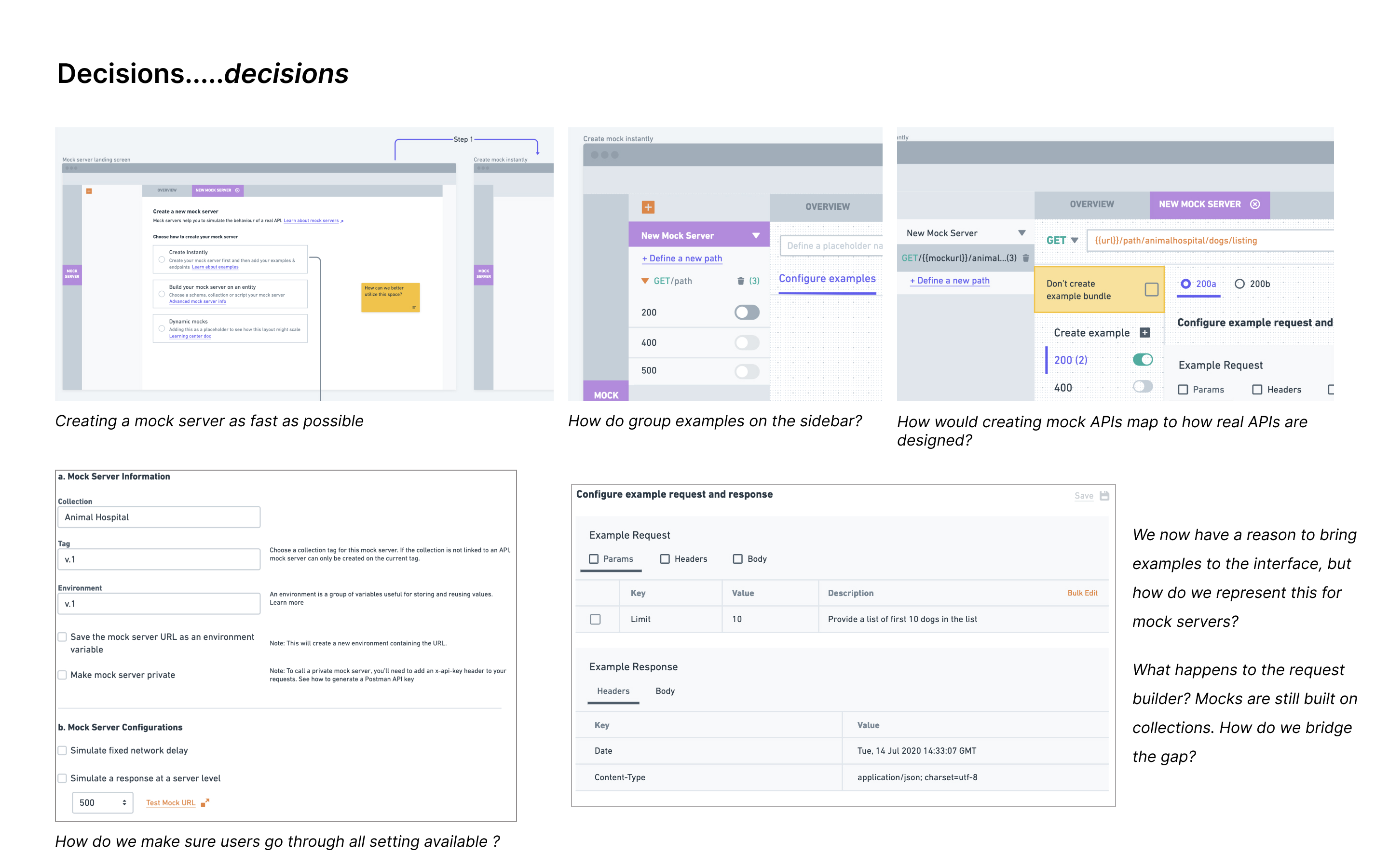
A collage of early Mock Server interface concepts exploring instant creation, grouping response examples, mapping mock APIs to real API structures, configuring requests and responses, and exposing all required settings.
Early concepts helped us test key product decisions with developers: how quickly a mock server should be created, how examples should be grouped, and how the experience should reflect real API workflows.

Instead of waiting until a redesign was finished to discover whether our assumptions were wrong, we could test ideas while they were still changing.

Observe → Build → Test → Learn → Iterate → Repeat

We worked this way for roughly 30 days.

The product direction gradually became something that had evolved alongside the developers using Mock Servers rather than something the team had brainstormed internally.

That changed the conversation when we eventually took the work to product leadership.

We weren't simply saying, here's what we think we should build.

We could show what we'd observed, what we'd tried, what hadn't worked, what we'd changed, and why we believed the product direction made sense.

Research had become part of product decision-making rather than a validation step at the end.

But once you let real users into the process this closely, research doesn't always follow the plan.

Things don't always go according to plan

One participant really didn't want to talk about the things I'd planned to discuss. He was frustrated with other parts of Postman. And for almost 45 minutes, he told us about them. Most of those problems weren't something I owned. But he was a customer. He paid for the product, used it regularly and had finally been given a direct line to someone from the company.

So I listened.

I couldn't promise that everything would be fixed, particularly when much of it belonged to other product teams. But I could make sure he felt heard and take the feedback back to the right people.

Even though things didn't go according to plan, I learnt something very important—and often tricky to solve for enterprises…

Users experience the product as a whole—not just the part your team owns.

They don't experience one feature as my team's product and another as someone else's product. They experience Postman. Sometimes useful research means allowing a conversation to go somewhere you hadn't planned, because that's where the user's actual experience is. After a month of working this way, we'd learned a lot about Mock Servers. But I'd also learned something about how designers could conduct research in a highly technical product without needing to work alone or already be the domain expert. That felt useful beyond one project.

Turning one product study into a reusable research practice

At the time, Postman no longer had the dedicated research team it previously had.

There was research knowledge within the organisation, but two challenges kept coming up:

  • Designers didn't necessarily have a clear, repeatable process for conducting user research independently.
  • A lot of designers also felt the same way I did: they were designers, not developers, so they didn't feel confident taking charge of these sessions with users.

The Mock Servers project had forced me to work through many of those questions myself.

How do you identify meaningful users using behavioural data? How do you recruit and compensate research participants? When should an engineer join a research session? How do you observe real developer workflows rather than rely only on self-reported behaviour? How do you involve users while product ideas are still evolving? And how do you turn research findings into product decisions?

By this point, we'd developed an approach that worked for us.

So I documented it.

I brought together the research structure, recruitment approach, templates, ways of partnering with engineers, iterative testing cycles and lessons from the Mock Servers study.

That became a reusable research playbook that other designers at Postman could use to conduct their own studies.

The project had started because I didn't know enough about the technical product I'd been asked to design.

It ended by giving other designers a structured way to learn what they didn't know too.

What I carried forward

Looking back, I'm proud of the product work we did on Mock Servers.

But the thing that stayed with me wasn't a particular screen.

It was learning how to design effectively when I wasn't the domain expert.

When I started, I thought my obvious weakness was that I didn't know enough about APIs. Over time, I realised that becoming the person who knew everything wasn't the goal.

I had engineers who understood the technology and users who understood their workflows better than any of us.

I had product analytics that could help me find the right users.

And I had research and design methods that could bring those perspectives together.

The important part was recognising where my understanding stopped and creating a reliable way to fill those gaps.

I now enjoy carrying this way of working into the increasingly technical products I've designed over the last three to five years.

Learning log 02

Turning our design and content collaboration into a skill the whole team could use

How we transformed shared guidelines and judgment into an evaluated AI skill that met people inside their workflows.

When I began designing for Data Kit, we didn’t have a content designer embedded in the team.

That didn’t mean the product had no content. It meant everyone contributed to it.

I wrote labels and messaging while designing workflows. Product managers helped explain unfamiliar ideas. Engineers added messages when they encountered missing states. Documentation teams needed to understand the terminology well enough to explain the product elsewhere.

We were all trying to make the product understandable, but we were making decisions at different times and with different contexts.

The inconsistencies appeared gradually.

The challenge wasn’t inconsistency within Data Kit. It was introducing a new product inside a much larger ecosystem where many words already carried established meanings.

Data Kit needed language for concepts that were new to the product, but some of those terms were already being used elsewhere in ServiceNow. A word such as “dataset” could mean one thing within Data Kit and something slightly different in another product. The language might be clear within an individual workflow, yet become confusing when users encountered it across the wider platform.

We needed to define a voice and vocabulary that made Data Kit feel coherent as its own product while remaining understandable to teams building the products around it.

That was when Rohit, a content designer, joined the project. Together, we began creating a shared tone of voice and a clearer terminology system for Data Kit, one that our team could use consistently and other teams across ServiceNow could understand.

We started designing together

Our collaboration began with reviews, but it quickly became co-design sessions.

Instead of sending Rohit a finished screen and asking him to improve the words, we started bringing him into the work earlier. We looked at workflows together, talked about what a user might already understand, what needed to be explained and where the product was asking them to learn something new.

Sometimes a content question changed the decisions on interface or experience.

If an action was difficult to name, perhaps the action itself wasn’t clear enough. If a message needed a paragraph to explain what had happened, perhaps the interaction wasn’t doing enough. If two similar concepts required different terminology, we had to understand whether users would recognise the difference too.

The experience was taking shape through both interaction and language.

I wasn’t designing a space and waiting for words to fill it. Rohit wasn’t editing language after the important product decisions had been made. We were shaping the experience together.

As we worked, Rohit began documenting the decisions we made.

The document grew into a set of content guidelines for Data Kit. It included voice and tone, a glossary, terminology, naming conventions, UI writing patterns, error messages and guidance for recurring components.

For the first time, design, product, engineering and documentation had a shared reference for how the product should communicate.

But having a shared document didn’t mean the guidance naturally became part of everyone’s work.

But how would people actually use the guidelines?

I regularly referred to the document while designing. I had also started giving the guidelines to Copilot, one of the AI tools available within the company, and asking it to generate content that followed them.

It helped. I could bring the document and the interface problem together, then ask Copilot to suggest content.

But the process still felt incomplete.

Every time I needed help, I had to move away from the work, bring the right context into the tool and explain what I was doing. The guidelines could answer questions, but they were waiting for someone to carry them into the conversation.

The more I used them, the more I realised that the problem wasn’t only the quality of the document.

The guidance needed to meet its users.

There were two kinds of users who would use these guidelines

The first was my team: Product, Engineering and Documentation. They needed a common reference they could return to whenever questions came up, with answers grounded in the decisions we had already made.

They also needed that context to carry from one conversation to the next. Copilot treated each interaction like a new beginning, which meant people had to repeatedly explain Data Kit, its terminology and the reasoning behind earlier decisions before they could get a useful answer.

The second user was me. At the time, before we had access to Claude and Claude Cowork, I spent most of my day in Figma. Content decisions happened while I was mapping a workflow, designing a component or preparing an experience for Engineering.

Moving between Figma, the guidelines and Copilot repeatedly interrupted that process. I needed the guidance to become available inside Figma, at the moment those decisions were being made.

The same knowledge needed to reach different people in different environments.

That became the real design problem I wanted to solve.

Could an agent carry the context for us?

Around this time, we received access to Claude at work.

I wanted to understand whether Claude could help me bring the guidelines closer to the work. I had previously tried building an agent with Copilot, but the setup had been extremely complex. I couldn’t get from the idea to something my team could easily use.

The experience was frustrating, but it didn’t make me abandon the idea.

I still wanted to build an agent.

By this point, I also had a clearer understanding of what that agent needed to do. It wasn’t enough for it to generate plausible interface copy. It needed to understand our terminology, remember past decisions and apply the standards Rohit and I had developed.

Most importantly, it needed to show up differently for the two groups using it.

For my team, I began setting up a shared Claude project that could work like a team brain.

The project gave us a place to maintain shared context over time. Within it, I built a content skill grounded in our guidelines. Product managers, engineers and documentation partners could ask questions for different reasons, while receiving answers informed by the same source of knowledge.

They didn’t have to know where a particular decision was documented or search through the entire guideline. They could ask the question they had and let the skill retrieve and apply the relevant context.

For me, the destination needed to be Figma.

Bringing the skill into Figma

I built a Figma plugin that could run the skill through Claude Code using an API key.

The plugin allowed me to select the part of the interface I was working on and ask for guidance without leaving Figma. The skill could return content inside the frame where I needed it.

This changed the experience completely.

Previously, I had to move between Figma, the guideline document and an AI tool. I had to reconstruct the context each time and then bring the answer back into the design.

Now, the guidelines could meet me inside the workflow.

I could select a layer, indicate the kind of content I needed and receive options shaped by our terminology and content standards. The context that had once lived across meetings, reviews and documents could now participate in the moment a design decision was being made.

The document had become active.

The skill also had to assess its answers

Generating content was only one part of the skill. We also needed a way to understand whether its suggestions were any good.

Together, we defined evaluation criteria around accuracy, completeness, understanding and efficiency. The skill checked whether an answer followed the content brief, used approved terminology, avoided known anti-patterns and made sense within the interface context. It then evaluated the answer against this rubric and showed how well it performed.

This mattered because an AI-generated suggestion can sound convincing while still being wrong for the product. It might ignore an approved decision, soften language we had intentionally made direct or misunderstand which part of the workflow I was designing.

Testing exposed these limitations.

The plugin could generate several options quickly, but it couldn’t always ask the clarifying questions a content designer would. It occasionally misunderstood the context of a selected frame. Some suggestions met the writing criteria while missing the intent behind the interaction.

Those failures helped us improve the skill’s instructions and recognise where human judgment remained necessary.

The skill could raise the starting point of a content review. Teams could receive guidance while they worked, I could consider content earlier in the interface, and Rohit could spend less time correcting recurring patterns. His attention could go towards the ambiguous decisions that genuinely needed his expertise.

Building the skill changed how we documented decisions

Many of the skill’s mistakes revealed gaps in our own documentation.

We had captured final decisions, but we hadn’t always preserved the reasoning that led to them. The skill needed to know why we preferred one term over another, which alternatives we had considered, where a rule applied and when an exception might make sense.

As part of the Claude Project, we began documenting this context more deliberately. We recorded who had contributed to a decision, what feedback had changed it and why the final version had been approved.

The clearer our reasoning became, the more reliably the skill could apply it.

This changed what documentation meant to me. I had previously thought of it as a way to help someone understand work that had already happened. Now, it could also influence work that hadn’t happened yet.

A decision captured today could guide the next person asking a question, the next designer working through a flow and the next version of the skill.

Documentation was becoming part of the product’s infrastructure.

Creating a shared context for the team

The Claude Project gave Product, Engineering, Design and Documentation a shared context space.

People could ask different questions while drawing from the same accumulated knowledge. They no longer had to begin every conversation by explaining Data Kit, defining its terminology and reconstructing the reasoning behind earlier decisions.

The context could be maintained collectively and carried from one conversation to the next.

The way we created that context mattered.

Rohit brought the content principles, terminology, rubrics and professional judgment. I brought the product context, workflows, interaction patterns and an understanding of where the capability needed to meet its users.

Together, we decided what the skill should know, how it should respond, how its answers should be assessed and when it needed to defer to a person.

The most valuable output was the reasoning we developed through working together, captured in a form that the wider team could use.

Designers need a voice in how AI enters the work

Roles across many industries are changing as AI becomes part of everyday work. That evolution will continue whether or not we participate in shaping it.

Designers are still responsible for making decisions. We decide which problems are worth solving, what people need, where automation can help and where human judgment needs to remain central.

This means developing a point of view about how AI enters our workflows. We should be able to identify where it can reduce repetitive work, where it can make shared knowledge easier to access and where it could weaken the quality of a decision. We also need ways to evaluate what it produces rather than accepting an answer because it sounds convincing.

In this project, AI helped us make our collaboration available to more people. It gave the team a shared place to access context, brought content guidance closer to the design process and helped us use Rohit’s expertise more deliberately.

Our collaboration remained central. The skill allowed the reasoning we developed together to remain available, even when neither of us was in the room.

That is the role I want AI to play in my work: carrying carefully developed human judgment further, while keeping people responsible for deciding where and how it should be used.